Monday, June 27, 2016

Price And Full Spesification Of Lenovo P70

Price And Full Spesification Of Lenovo P70.


Lenovo P70. This is full spesification of Lenovo P70.
Price And Full Spesification Of Lenovo P70.


Display.

  • Type : IPS LCD capacitive touchscreen, 16M colors
  • Size : 5.0 inches (~67.6% screen-to-body ratio)
  • Resolution : 720 x 1280 pixels (~294 ppi pixel density)
  • Multitouch : Yes, up to 5 fingers

Memory.

  • Card slot : microSD, up to 32 GB
  • Internal : 16 GB, 2 GB RAM

CPU & Chipset

  • CPU : Octa Core 1.7 GHz Cortex-A53
  • Chipset : Mediatek MT6752

GPU.

  • GPU : Mali-T760MP2

Operating System.

  • OS : Android OS, v4.4.4 (KitKat)

Camera.

  • Primary : 13  MP, 3264 x 2448 pixels, autofocus, LED flash, check quality
  • Features : Geo-tagging, touch focus, face/smile detection, HDR, panorama
  • Video :1080p@30fps, HDR, check quality
  • Secondary : 8 Mp

Connections.

  • WLAN : Wi-Fi 802.11 b/g/n, hotspot
  • Bluetooth : v4.0, A2DP
  • GPS : Yes, with A-GPS
  • Radio : FM radio
  • USB :microUSB v2.0, USB Host

Battery.

  • Type : Non-removable Li-Po 4000 mAh battery
  • Stand-by : Up to 816 h (2G) / Up to 696 h (3G)
  • Talk time : Up to 46 h (2G) / Up to 18 h (3G)

Price Of Lenovo P70 To day.

Visit This link : 


    New Windows 8 Secret Shortcuts Tips To Save Time Windows 8

    Windows 8 was released in 2013 and since then it is getting mixed reviews from the critics. It was the OS released from Microsoft which can be used on both PC and Tablets. There were many new features like the introduction of tiles and new ways of navigation. Many users find it difficult to operate windows 8 through a keyboard and a mouse and they consider it only as a touch friendly operating system.


    For such users Microsoft has integrated new keyboard shortcuts to let them navigate through the reconstructed OS faster and easier. And as much fun as touchscreens can be, sometimes you can do more with keyboard shortcuts than you can with swipes. Besides, if you are part of the keyboard generation, shortcuts just come more naturally anyways.

    So here comes the list of the secret keyboard shortcuts to make you feel comfortable and save your time while working on Windows 8


    • Press the Windows key to enter the tiled Start screen.
    • The Windows key + M minimizes everything thats showing on the desktop.
    • The Windows key + E opens Explorer for quick access to folders.
    • On the Start screen, press the Windows key + D to instantly get to the desktop.
    • The Windows key + Tab opens a list of currently running programs.
    • The Windows key + Print Screen takes a screenshot and saves it in a Screenshots folder nested in your Pictures folder. 
    • To take a screenshot on a Windows 8 tablet, simultaneously press the Windows button and the volume-down button on the tablet chassis.
    • The Windows key + Q opens a global search menu. Type what youre looking for and where you would like to look.
    • The Windows key + W opens a search in your system settings to quickly locate and change system properties.
    • The Windows key + F opens a file and folder search.
    • The Windows key + Pause opens the system properties page to show you a quick rundown of your specs.
    • The Windows key + "," (thats the comma sign!) makes all current windows transparent, giving you a peek at the desktop as long as you hold down the Windows key.
    • The Windows key + "." (the period) snaps a window to the right or left side (toggling each time you press ".").
    • The Windows key + R prompts the Run commandâ€"useful for quickly launching apps and other routines with a command prompt.
    • The Windows key + X opens the Quick Access Menu, exposing system functionality such as the Command Prompt, Disk Management, File Explorer, Run, and more. Alternatively, you can right-click on the bottom right corner of the screen to spawn the Quick Access Menu.
    • The Windows key + I opens the settings menu, giving you quick access to the Control Panel, Personalization, and your Power button, among other features.
    • The Windows key + O locks orientation on devices with an accelerometer.

    LG Optimus Dynamic II Review

    Review of the Android LG Optimus Dynamic II by Tracfone

    This review by TracfoneReviewer, will cover the features, specs, buying information and overall opinion for the LG Optimus Dynamic II (LG L39C) from Tracfone.

    LG Optimus Dynamic II LG L39C front
    Front of the LG Optimus Dynamic II
    The LG Optimus Dynamic II is essentially the replacement for the somewhat underwhelming (although much cheaper) LG Optimus Dynamic that Tracfone released with three other Android Smartphones, the Samsung Galax y Centura, Huawei Glory, and ZTE Valet, in mid 2013.

    The Dynamic II is for use with Tracfone prepaid wireless service, and will not work with other service providers. Tracfone is a low cost, prepaid cell phone company throughout the US and they have several other companies under them, including StraightTalk and Net10. But Phones from one will not work with other companies.

    The Dynamic II, along with the other Android Smartphones offered by Tracfone, runs on Verizons 3G CDMA network. Be sure to check how the coverage in your area is before buying this phone.

    Lets get straight to the Features and Specs for the Dynamic II.

    LG Optimus Dynamic II Features and Specs:

    This smartphone comes with several impressive and convenient features.
    • 3.8" Touchscreen
    • Android 4.1 Jelly Bean with access to thousands of apps on Google Play
    • Triple Minutes for Life
    • Separate talk/text/data
    • 3G speeds on Ve rizons network
    • WiFi Connectivity
    • Bluetooth
    • 4GB Micro SD card included
    • 3MP camera (fixed focus)
    • MP3 Player
    • Hearing Aid Compatible
    • GPS
    • Gravity/Shake/Tilt sensor
    • Mobile Web, Email, Text, Caller ID etc.
    • Handsfree speaker
    • Voice Dialing
    LG L39C Specs and Dimensions:
    • Phone Size: 4.43" x 2.55" x 0.47"
    • Screen Size: 3.8" (320x480)
    • Weight: 4.44 OZ
    • 1 Ghz Processor
    • 512MB RAM
    • Compatible with up to a 32GB Micro SD card
    • Battery Life: 8 hours talk, 11 days on Standby
    If one compares the Dynamic II to the Dynamic, the Dynamic II is basically an improvement in almost every category. Screen size, battery life, processor and Android OS are all improved over the older version, and even over some of the other Android offerings from Tracfone.

    Lets briefly highlight some of the feature s we like, and dont like on the LG L39C:

    LG Optimus Dynamic II - Likes and Dislikes:

    What We Like About the Phone:

    He Dynamic II comes with Android 4.1, which is a newer version of the OS, but not the newest (the newest is currently 4.4). However, this is one of the newest versions that Tracfone is offering.

    LG Optimus Dynamic II Review
    Google Maps on the LG L39C
    For those that might be unaware, Android is an operating system like Apple or Windows 8 but for cell phon es. It allows you to have access to thousands of apps (like programs) that give the phone a huge list of possible features, depending on which apps you install. For more information, visit Google Play.

    Screen size: The LG Optimus Dynamic II comes with the largest screen size of any Tracfone yet, at 3.8 inches (measured diagonally). This makes it easier to see things, easier to read things, and provides more area to work on the phone.

    To give some perspective, the older, LG Optimus Dynamic had just a 3.2" inch screen and the even older LG 800G had even less at 2.8". The other Android smartphones from Tracfone have 3.5" screens.

    Additional points about the LG L39C: The phone comes with a 3MP camera which will take good pictures outdoors, but probably will major problems in low light. WiFi has been reported as quite decent, and is a great way to save your data. Just make sure you turn off data when not using it!

    There are many other g reat features included with this phone which you can see in the feature list above. Now lets take a look at some shortcomings for this phone.

    What We Dislike about the LG Optimus Dynamic II

    First off, this phone is, at this time, the latest and greatest offering from Tracfone, so there is a lot that it does right. However, we do want to point out a few shortcomings, or things we wish Tracfone would change.

    The internal memory and RAM are still somewhat small compared to other modern smartphones. The 512mb of RAM is decent enough, but if you load up a lot of apps, you might push this phone to its limit pretty quickly. The Dynamic II has a little less than 2GB of internal memory for apps and other storage. This is OK, but if you plan to store a lot of movies or pictures, get a large SD card and try to put it on there. (This phone does come with a 4GB SD card which is nice).

    The LG Optimus Dynamic II runs on Verizon 3G, along with all of Tracfones other smartphones, and gets fairly good connectivity and coverage. However, roaming on these phones is not good, so if you travel frequently, you might want to wait to buy a new phone.

    Finally, Promo Codes no longer work with Android phones from Tracfone which is a disappointment.

    Adding and Tracking Prepaid Minutes on the Dynamic II

    The way your track minutes, and how minutes are split up on the Android phones from Tracfone are a bit different, so we will cover that here.

    Data, Talk and Text are now split into three separate pools so that when you call or use data, you will still have the same number of texts as before. (EX: If you add a 200 minute card, it will be automatically tripled, and you will receive 600mb of data, 600 minutes for talk, and 600 texts).

    This is a pretty good deal for almost anyone, except those who might do a lot more texting than calling or surfing the web. However, ther e are free apps that will text others for free when on WiFi or Data.

    To check your airtime balance:
    The easiest way to check your airtime on the LG Optimus Dynamic II is to download Tracfones Airtime App. It is pretty simple to set up, and you can add airtime through it as well. You can almost go on the Tracfone website and check your account from there.

    Phone Covers and Cases for the LG L39C:

    The Dynamic II is prone to scratches, especially on the glass touchscreen, so it is a good idea to get a case and screen protector.

    The Thousand Eight rubberized L39C cover is a good option, or you can view all the cover choices on Amazon including screen protectors.

    Overall Review and Buying Tips for the LG Optimus Dynamic II

    lg opt   imus dynamic II review
    Dynamic II on Amazon
    The Dynamic II is a sleek, modern smartphone that is honestly one of the best choices from Tracfone at this time. It has a larger screen than any other phone, and the rest of its features are similar or better as well.

    Users have been reporting a large number of positive reviews, with few problems unlike the ZTE Valet or older Dynamic. (the Valet has had many reports of poor WiFi connection, and the old Dynamic is slower, and smaller).

    Retailing for about $110, the LG Optimus Dynamic II is $99 on Amazon at this time, and can also be found at a great deal on sites like eBay, HSN a nd others.

    If you check out the phone on Amazon, it has received an average rating of 4.2 out of 5, and there are a number of questions and answers available for additional information.

    We do want to mention that there are some new phones on the horizon coming from Tracfone: The LG Optimus Fuel (LG L34C) is currently available, and the Samsung Galaxy Ace Style and Moto E are coming soon.

    Thanks for visiting and reading, and be sure to leave a comment below with your questions, or your thoughts on the LG Optimus Dynamic II.

    If youre phone shopping, check out all or reviews on the Cell Phone Reviews page.

    You might also want to see the Top Sales and Discounts on Tracfone Cell Phones.

    Additional Resources:
    L G Optimus Dynamic II Tutorial - View the full and interactive tutorial to learn more about the Dynamic II

    LG Optimus Dynamic II User Guide - This is a complete, 80 page PDF user guide.

    December 2012 will present the Samsung Galaxy Grand To The Medium

    December 2012 will present the Samsung Galaxy Grand To The Medium? - One source reported that at this time the Samsung is preparing a tablet phone named Samsung Galaxy Grand, and it is planned that the Samsung will announce the Samsung Galaxy Grand in December 2012. Samsung Galaxy Grand intended for intermediate users and will be marketed at a reasonable price or cheaper. Samsung released the Samsung galxy Grand because as we all know that the series Galaxy Note that has been present beforehand, gained a lot of attention from the users so that the Samsung was trying to develop a cheaper version of Galaxy Note this series.

    Parties to the Federal Communications Commission reported that the Galaxy Grand has a specification such as using a screen size of 5 inches with resolution of 800 x 480 pixels, powered by a quad-core Samsung Exynos 4412, will be run by the operating system android 4.1.1 Jelly Bean, and already network supports LTE, 3G, Wi-Fi, NFC and equipped with battery life with 2100 mAh capacity.

    But unfortunately the rumored Samsung has not given a release date is officially about the Samsung Galaxy Grand as well as the selling price in the market and also whether this Samsung Galaxy Grand will be available in all countries globally, but it is certain that the Galaxy Grand will present at the upcoming December 2012 ?

    SONY ERICSSON TM506 CELL PHONE

    Sony Ericsson TM506 cell phone - has been published by sony.com,comes with main specs and features such as:  and this close cousin of the Z780 suport T-Mobiles 3G network,key features include GPS,QVGA display,2 megapixel camera,setreo bluetooth,music player,memory car slot,HSDPA dats,full browser and plus RSS reader

    sony ericsson mt 506 cell phone


    The Sony Ericsson TM506 specs containt a weight 3.5oz,dimensi 3,74"x 1.86" x 0.7,display type LCD resolutions 240 x 320 pixels (QVGA) 2,2" diagonal,memory 32 MB internal storage and many more

    Then Sony Ericsson TM506 features containt a GPS languages supported by english,spanish,french,portuguenes,polyponic ri ngtones,monochrome LCD 128 x36 pixels/1,1 inch,connectivity bluethoot,USB,PC Sync,real music ringers,supported by MP3,MP4,3GPP,WMA pro,alarm,calculator,music player,photo and video,streaming video


    Sunday, June 26, 2016

    Download Firmware Sony Xperia M4 AQUA E2312 DUAL E2303 E2333 DUAL E2353 E2363 DUAL E2306 using Xperifirm

    Download Firmware Sony Xperia M4 AQUA (E2312 DUAL, E2303, E2333 DUAL, E2353, E2363 DUAL, E2306) using Xperifirm.

    Download Firmware Sony Xperia M4 AQUA. In this guide We will show you how to download the firmware Sony Xperia M4 AQUA (E2312 DUAL, E2303, E2333 DUAL, E2353, E2363 DUAL, E2306) using Xperifirm, By using Xperifirm application its lets you download the current firmware for all Sony/Sony-Ericsson smartphones and tablets running Android operating system. This application run only on windows, linux and OS X computer. So, with this tools will help you to get the latest firmware from Sony Xperia. If youve got the firmware from xperifirm, you can do something on your Android device such as : downgrade and upgrade firmware and versions, fix an error on Android system, resolve a bootloop and much more. 

    T his guide specifically for Sony Xperia M4 AQUA (E2312 DUAL, E2303, E2333 DUAL, E2353, E2363 DUAL, E2306), so if you found and need this information, you are in the right place now. But you need to know more in the specification of Sony Xperia M4 AQUA (E2312 DUAL, E2303, E2333 DUAL, E2353, E2363 DUAL, E2306), Sony Xperia M4 AQUA (E2312 DUAL, E2303, E2333 DUAL, E2353, E2363 DUAL, E2306) is the smartphone smartphone released on March, 2015. with 5,0 Inchi wide IPS LCD capacitive touchscreen, 16M colors, work on Android OS, v5.0 (Lollipop), planned upgrade to v6.0 (Marshmallow) and supported with Qualcomm MSM8939 Snapdragon 615 chipset, Processor Quad-core 1.5 GHz Cortex-A53 & quad-core 1.0 GHz Cortex-A53, combined with 2 GB of RAM, 13 MP on primary camera and 5 MP on secondary camera.

    Now follow this guide below to Download Firmware Sony Xperia M4 AQUA (E2312 DUAL, E2303, E2333 DUAL, E2353, E2363 DUAL, E2306) using Xperifirm.

    Basic Requirement for your PC.

    You need this file to run Xperia Firmware (Xperifirm) Downloader Tool based on your computer operating systems.
    1. Windows XP Service Pack 3. 
      • You must download and install .Net Framework 4.0 click here to get this file
    2. Windows Vista / 7 
      • You must download and install .Net Framework 4.6 RC click here to get this file
    3. Windows 8/8.1/10
      • Pre installed
    4. Linux
      • Enter the following lines once per computer :
        • $ sudo apt-get install mono-complete
        • $ sudo mozroots --import --machine --sync
        • $ sudo certmgr -ssl -m https://software.sonymobile.com
      • When asked you must enter Y, you should be asked to do so twice)
      • Enter the following line to launch XperiFirm:
        • $ mono XperiFirm.exe
    5. Apple OS X
      • Install Mono for OS X:
        • http://www.mono-project.com/download/
      • Enter the following in Terminal:
        • $ mono XperiFirm.exe

    Download Firmware Sony Xperia M4 AQUA.

    If you already meet the basic requirements to run xperifirm on your computer, Now we need to download Xperifirm, and follow this guide.
    1. Download Xperia Firmware Downloader Tool.

    2. Once download finished extract and run this tool from your computer.
    3. To run this xperifirm you must be connected to the internet connection.
    4. Double click on Icon program shown below. to run this program your computer must be installed .NET framework 3.5 or above.
      Xperia Firmware Downloader Tool icon
      Xperia Firmware Downloader Tool icon
    5. Then the program will open loading windows, to checking for update, requesting log in data,  and downloading resource. 
      loading window xperifirm
      loading window xperifirm
    6. When the program fully loaded, now you can select your Sony Xperia M4 AQUA (E2312 DUAL, E2303, E2333 DUAL, E2353, E2363 DUAL, E2306) model and version in the left navigation windows. 
      Download Firmware Sony Xperia M4 AQUA (E2312 DUAL, E2303, E2333 DUAL, E2353, E2363 DUAL, E2306)
      Download Firmware Sony Xperia M4 AQUA (E2312 DUAL, E2303, E2333 DUAL, E2353, E2363 DUAL, E2306)
    7. See on the right panel window, and you will find all country and market which support your Sony Xperia M4 AQUA (E2312 DUAL, E2303, E2333 DUAL, E2353, E2363 DUAL, E2306) devices. on this window we will know what is android version on the number shown at latest release
      Xperifirm Tool market and operator
      Xperifirm Tool market and operator
    8. To start download this firmware you can navigate your pointer to the right above of this window, under link donate paypal you can click firmware build number shown.

      Xperia Firmware Downloader Tool download firmware
      Xperia Firmware Downloader Tool download firmware
    9. Then you will see xperia firmware downloader dialogue box appear on your screen.
      Xperia Firmware Downloader Tool dialogue box
      Xperia Firmware Downloader Tool dialogue box
    10. Then you will be forced to browse the folder where will you save your firmware file on your computer. Usually go directly  to download folder. When you finish decide the folder you can click OK.
      Xperia Firmware Downloader Tool browse folder
      Xperia Firmware Downloader Tool browse folder
    11. And download process will start now, It will take a minute or hour depending your firmware file size.
      Xperia Firmware Downloader Tool download process
      Xperia Firmware Downloader Tool download process
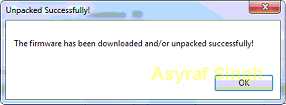
    12. Once your download complete, you will  see the following pop message “Unpacked Successfully!” Cl ick OK.
      Unpacked Successfully xperia firmware download tool
      Unpacked Successfully xperia firmware download tool
    13. The same “Unpacked successfully!” message will  appear on the download dialog. Now you can Click “Close”.
      Unpacked Successfully xperia firmware download tool
      Unpacked Successfully xperia firmware download tool
    14. Now check your download location and you will  find a new folder that contains your firmware files.
    15. Inside the folder download, you should find a number of files that look similar to the picture below.
      content firmware file
      content firmware file
    16. If your list of firmware files includes “fwinfo.xml” as shown below you can manually delete it before continuing to the FlashTool steps. You MUST delete this file otherwise your FTF firmware file will corrupt.
      delete fwinfo.xml file
      delete fwinfo.xml file
    17. Good luck and feel free to download Sony Xperia M4 AQUA (E2312 DUAL, E2303, E2333 DUAL, E2353, E2363 DUAL, E2306) Fimrware.

    Browser Axis Yahoo for iPhone iPad and Desktop PC

    Browser Axis Yahoo for iPhone, iPad and Desktop PC - Yahoo, a search engine that is still alive today launched their newest form of a browser. Browser from yahoo was given the name Yahoo! Axis.

    Browser from yahoo is more specific to mobile platforms Apple iOS (iPad and iPhone). Yahoo Axis is available as a separate application for the iPhone and iPad but for a desktop user can use the form plugin for Chrome, Firefox and Internet Explorer.

    Yahoo Axis for iPad and iPhone is only available in the U.S. iTunes store. Use the link below to download and install Yahoo Axis on the iPad and iPhone.
    Download Yahoo Axis for iPad.
    Download Yahoo Axis for iPhone.
    Yahoo Axis Plugin.